


What is WordPress?
Introduction: WordPress
WordPress is a widely used Content Management System (CMS) that helps businesses create, manage, and scale websites efficiently. As an open-source platform, it offers full ownership, flexibility, and strong security, supported by a global developer community. WordPress is no longer just for blogging, it has evolved into a full-featured platform for complex business websites. Its user-friendly dashboard simplifies content management, while thousands of themes and plugins allow easy customization. Businesses can build websites that match their branding, functionality, and user experience needs. WordPress supports all types of websites, from small business pages to enterprise platforms, making it a versatile and cost-effective solution.
Importance of WordPress in Corporate and Office Environments
In modern office environments, digital presence is critical for communication, branding, and customer engagement. WordPress plays a central role by providing a unified platform where different teams can manage and update content efficiently. Departments such as marketing, HR, operations, and management can collaborate while maintaining role-based access control.
WordPress reduces dependency on technical teams for routine updates, enabling faster content publishing and real-time updates. This leads to improved productivity, better content accuracy, and quicker response to business needs. For organizations with frequent updates, WordPress significantly improves operational efficiency.
What Can You Build with WordPress?
WordPress supports the development of a wide range of business and enterprise websites. Organizations can build corporate websites, service-based portals, product showcase sites, blogs, news portals, knowledge bases, customer dashboards, and complete e-commerce platforms.
The platform allows businesses to start with a basic website and gradually expand features such as payment gateways, multilingual support, user login systems, analytics, and automation tools. This scalability makes WordPress a long-term digital investment.

WordPress.com vs WordPress.org
WordPress.com
WordPress.org
Fully managed platform.
Hosting, security, and maintenance handled automatically.
Best for small websites and beginners.
Limited customization options.
Restricted plugins and themes.
Branding control limited on free/basic plans.
Paid plans required for advanced features.
Self-hosted platform.
User manages hosting, security, and maintenance.
Best for businesses and professionals.
Full customization freedom.
Unlimited plugins and themes.
Complete branding and design control.
No platform fee (only hosting cost).
WordPress.com is suitable for users who want a simple and managed solution with minimal technical effort. WordPress.org is the preferred choice for businesses and organizations that need full control, scalability, and advanced customization.
Create Your Website Without Coding Using WordPress
One of the strongest advantages of WordPress is its no-code and low-code capability. With modern visual editors, drag-and-drop page builders, and customizable templates, users can design professional websites without writing code.
Office staff can create pages, update content, manage images, and modify layouts independently. This reduces development time, lowers costs, and empowers non-technical teams to contribute actively to digital operations.

Types of Websites
WordPress can create: Corporate sites, blogs, online stores Educational, nonprofit, portfolio, event sites Internal intranet systems It fits industries like IT, healthcare, education, finance, retail, marketing, and manufacturing.
IT Perspective :
WordPress can create:
Corporate sites, blogs, online stores Educational, nonprofit, portfolio, event sites Internal intranet systems. It fits industries like IT, healthcare, education, finance, retail, marketing, and manufacturing
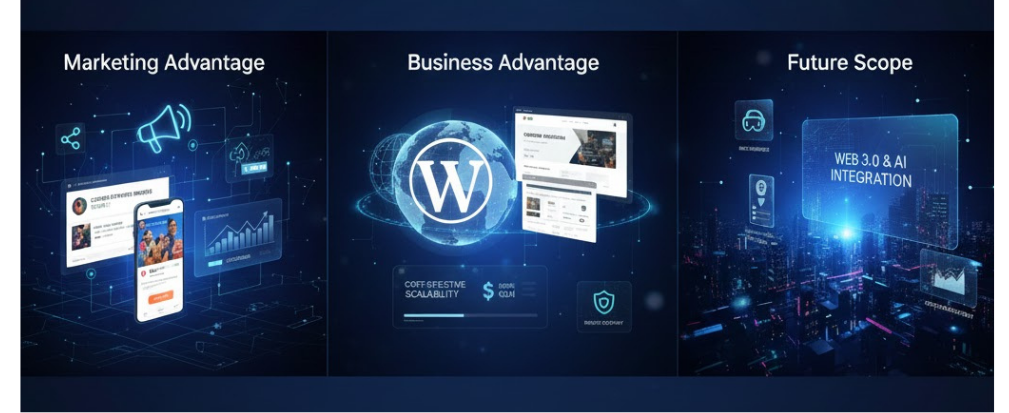
Marketing Perspective
Content management: Create blogs, landing pages, campaigns, press releases, multimedia content.
SEO & marketing: Supports clean URLs, meta tags, XML sitemaps, performance optimization, SEO plugins for traffic growth.
Business Advantages
Cost-effective, reduces development costs
Internal content management, feature expansion via plugins
Suitable for startups and enterprises.
Used for corporate websites, HR portals, training platforms, event sites, and support portals.
Centralized content and smooth inter-department collaboration.
Future Scope
WordPress continues to evolve with updates, enhanced security, AI features, and modern editing tools, supporting digital transformation and emerging technologies.
Frequently Asked Questions (FAQ)
1. What is WordPress and why is it popular?
WordPress is a Content Management System (CMS) used to create and manage websites easily.
It is popular because it is flexible, user-friendly, and supported by a large global community.
2. What is the difference between WordPress.com and WordPress.org?
WordPress.com is a hosted platform with limited customization options.
WordPress.org is self-hosted and gives full control over design, features, and plugins.
3. Do I need coding skills to use WordPress?
No, you don’t need coding skills.
With drag-and-drop builders and ready-made themes, anyone can create a website easily.
4. What types of websites can I build with WordPress?
You can build blogs, business websites, e-commerce stores, portfolios, educational platforms, and intranets.
5. Is WordPress secure and suitable for business use?
Yes, WordPress is secure and business-ready.
With regular updates and trusted plugins, it is reliable, scalable, and widely used by companies.